Plan vs. Actual View
Compare your budgeted amounts against actual spending with status-based variance tracking.
See Where Your Money Really Goes
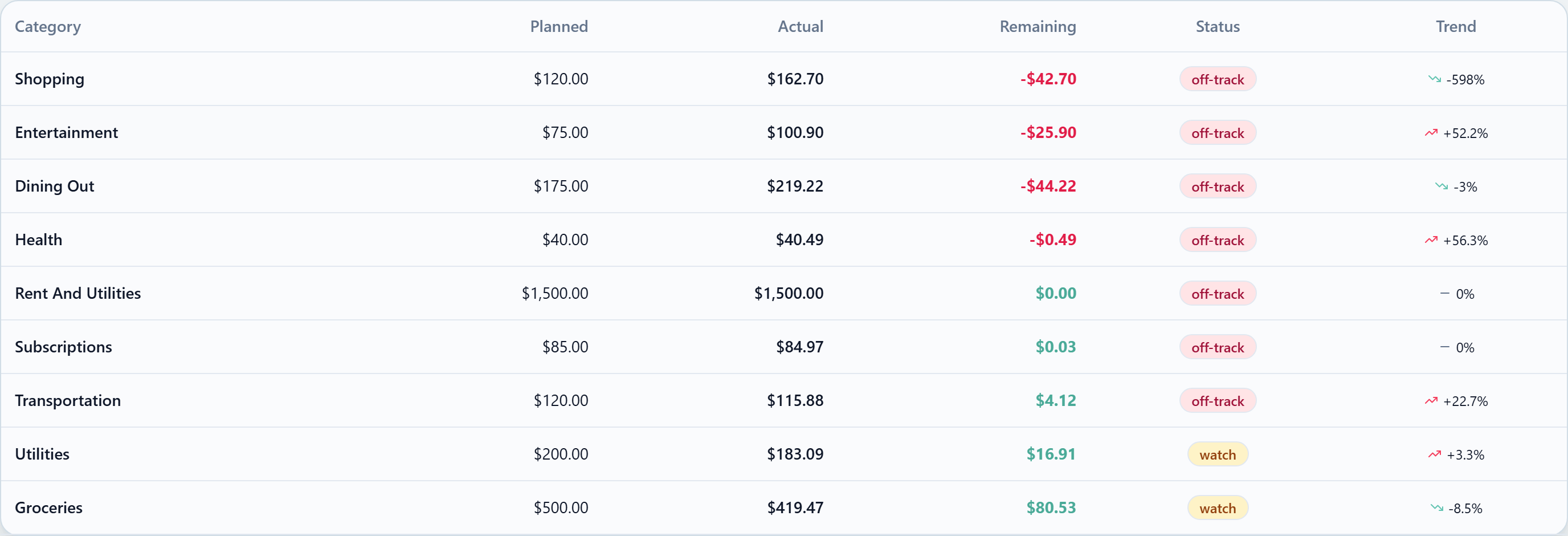
The Plan vs. Actual view is the default Budget screen for the Envelope strategy. It puts your planned amounts side by side with your real spending so you can spot where you are on track and where adjustments are needed.
How It Works
For each envelope, NivoaFlow displays:
- Planned — the amount you budgeted for the month
- Actual — the total you have spent so far
- Remaining — what's left, including any rollover from the previous month
- Status — a badge that summarises how you're tracking
- Trend — how this month's spending compares to the previous month (desktop only)
The summary cards at the top of the page show how many envelopes are on track, watching, off track, and the total remaining across the whole budget.
Status Badges
Instead of a single colour bar, each row carries a status that reflects how you're trending:
| Status | Meaning |
|---|---|
| On track | Spending is comfortably within the planned amount |
| Watch | You're getting close to the limit and should slow down |
| Off track | You've crossed the planned amount for this category |
Reading Remaining
The Remaining column shows what you still have available, factoring in any rollover from prior months:
| Category | Planned | Actual | Remaining |
|---|---|---|---|
| Groceries | $400 | $350 | $50 |
| Dining Out | $150 | $180 | -$30 |
| Entertainment | $100 | $95 | $5 |
A positive number means you still have room. A negative number means you've gone over.
If the envelope has rollover enabled, you'll also see a small "+$X rollover" or "-$X rollover" indicator below the category name to show how much of that remaining figure came from the previous month.
Using the View Effectively
Mid-Month Check-In
Review your plan vs. actual around the 15th of each month. If you are already at 70% of a category budget, you know to be cautious for the rest of the month.
End-of-Month Review
At month end, use the view to assess your overall performance. Look for categories that consistently run over — these may need higher allocations. Categories that always come in under might have room to be reduced.
Identify Patterns
Over time, the plan vs. actual view helps you build a more accurate budget. If Groceries is over budget every month, your planned amount is probably too low.
Tips
- Do not aim for perfection — being within 10% of your plan is excellent
- Adjust proactively — if you know a big expense is coming, increase the envelope before you overspend
- Focus on trends — one bad month is not a failure; three bad months in the same category is a signal
Use this view alongside envelope budgeting or zero-based budgeting for maximum effectiveness.